Posts

Showing posts with the label LabVIEW

I am a text-based traitor

I realised the other day that's it's been more than a year since I used LabVIEW! After a couple of job changes, I've ended up using other languages but I do still have a huge soft spot for LabVIEW and graphical code. That being said, I hadn't realised how different the text-based ecosystem felt in terms of tools and workflows. Here's some of the things that have blown my mind: Text diffs in MRs on GitLab where you can add comment threads to line ranges. I guess you can still add comments to LabVIEW MRs on a file-by-file basis but there's nothing like being able to point to an exact line! (Or subVI, I guess!). Even being able to see the code in GitLab instead of having to pull it down to check what it is is super nifty. Being able to `Git blame` in the browser in GitLab, or within Git itself. This basically shows a log of who changed a line and what they changed it to. In LabVIEW there's not a simple way of seeing who messed with your code without pulling up ...

LabVIEW on Ubuntu!

Image
Greetings LabVIEW friends, Yesterday I decided to have another go at LabVIEW on Linux, to see if I could help make Antidoc compatible with Linux machines. I decided to use Ubuntu because it's compatible with LabVIEW and still fairly popular. I started off with several failed attempts: I dug around for my old Raspberry Pi 2B+ which was running Ubuntu and I'd already installed LabVIEW on, but it looks like I must have left it at work before I got made redundant last year. 😕 RIP. I borrowed my fiancé's spare Pi 4B and put Ubuntu 22.04 LTS AMD64 on an SD card using Balena Etcher, but it wouldn't boot from it. I switched to Raspberry Pi Imager to prepare the SD card and got my Ubuntu up and running. Success! But when I went to install the LabVIEW 2023 Q4 package I realised the new Pis use ARM architecture and LabVIEW doesn't support that. Also explains why I didn't have any success with that AMD64 ISO... I decided to use Hyper-V to make myself a VM... nope, I am usi...

Custom QuickDrop Shortcut - Git Diff/LVCompare

Image
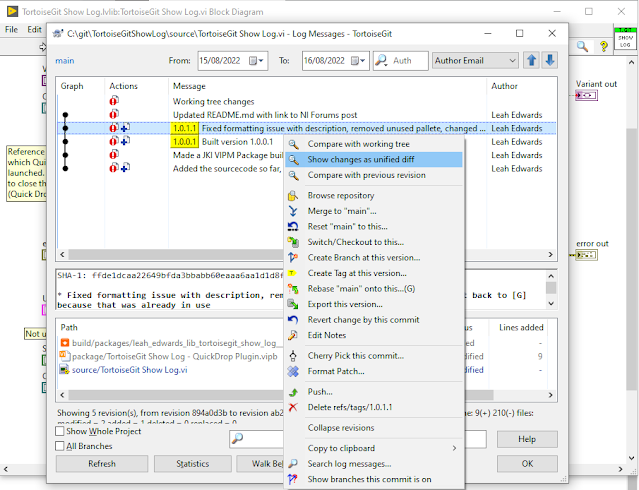
Do you use the LVCompare diff tool? I do, all the time now. If you haven't used it before, it's like playing spot the difference between 2 versions of the same VI but LabVIEW will list what is different and take you to the location of the differences. It's great. My favourite uses are: Double checking before committing files that what I think I changed is what I actually changed, to make sure I have good commit notes and didn't do anything by accident Especially when I see a file listed that I didn't think I did any work on... This normally results in reverting it after checking what the difference is! Understanding what someone actually changed, usually when doing code reviews or pull requests If I find what looks like 2 versions of the same file, checking they are actually the same. I had the tool set up to work with my Git GUI of choice, TortoiseGit. I would normally run it by navigating to Windows Explorer, right clicking on a file or a log entry and selecting w...

How to Set Up 'Arrange VI Window' for an Orderly Project

Image
Nowadays at work I get to use LabVIEW 2020, which has some great inbuilt shortcuts. One of these is 'Arrange VI Window'. Arrange VI Window was added into LabVIEW 2019, but can be downloaded for earlier LabVIEW versions here . The default QuickDrop shortcut is Ctrl + Space, Ctrl + F . It does many things apart from arranging the windows - moving the origin to (0,0), aligning controls on the front panel to match the connector pane ('clean up front panel'), and resizing the windows to fit the code or as much code as possible with a small border. These are all great. But I was after something in particular that it didn't seem to provide.

GLA Summit 2021 Report

Image
I had been looking forward to GLA summit for months, so much so that I booked the time off work so I could concentrate fully!   There were so many great presentations, but some personal highlights for me were:

Why my friend hates LabVIEW

Image
So there's a lot of takes on why some people hate LabVIEW. Here's mine. I have a friend who is an engineer and had been asked to learn LabVIEW for a work project. 'Oh goodie', I thought, 'someone else to talk LabVIEW with!' But to my sorrow, he gets angry even when the word 'LabVIEW' is mentioned. He hates it. 'I can't find the examples. It's so slow to write. I can't get it to work.'.

The Beer Money Problem - Two Less Successful Solutions (#3)

Image
This is the final post about the MLUG Beer Money challenge: if you are lost, start here . The first solution method that I describe isn't particularly fast, but it is fun.

The Beer Money Problem - Improvements with Recursion (#2)

Image
This is Part 2 of the beer money problem, see intro and Simple Nested Loops Solution (#1) . Recursion - yay. Having a VI that calls itself that calls itself that calls itself... then finally breaks out. 

The Beer Money Problem - A Simple Approach (#1)

Image
This post is about my first attempt at answering the MLUG beer money challenge outlined in this post . So, where to start? After grappling with this problem for a while, I decided to type up exactly what I was doing when trying to solve it on paper, and go from there.

The Beer Money Problem - MLUG Coding Challenge (Intro)

I like a good coding challenge, and this one is particularly fun. It was set by the wonderful folks at MLUG and goes like this: I went to the supermarket to get some beers for the Euros final and my bill came to £11.99. With the money detailed [below], how many combinations are there that make up the exact change to pay my bill?  

End of NXG?

I was very shocked when I heard the news at work about NI binning NXG . NXG was announced back when I worked at NI and I still remember the excitement people had for a more modern LabVIEW - that "ooh" as they demo'd the zoom, those flashy web VIs. 

Library Folder Structure

Image
 Greetings LabVIEW nerds, It's been a while! I've been busy. You see, recently I've been working on a re-use library that has the potential to be used by any LabVIEW developer within the organisation who is in a manufacture or test role - in fact, it could be included in every jig. So considering the number of people who might use it, it's worth taking the time to make it nice and developer-friendly. I've spent many hours writing the documentation, unit tests, examples, etc. Even to the point that I did a re-write to remove all dependences. (I hadn't realised that different versions of OpenG would cause headaches for people, oops.) Something that I sought advice on was my folder structure for my library. I had always been on team ' Project Explorer structure mirrors the disk ', but when it came to where my Unit Tests, VI Tree, Examples etc. lived, I couldn't make my mind up. And moving them around isn't an easy task. Top tip: You can click on a ...

Marking 1 year since graduation!

It's 1 year now since I graduated and started work! So a good time for reflection.

Find Callers vs. Find All Instances

Image
Hello LabVIEW friends, Sometimes it can be very useful to know where a bit of code is used or called from. There's several ways of doing this in LabVIEW: Find Callers, Find All Instances and VI Hierachy to name a few.

LabVIEW Toast Simulator

Image
I wrote 'Toaster for LabVIEW' in my free time, back when I had just started full-time work. You see, I was eating my breakfast at work, but we didn't have a toaster so it was breakfast sandwiches for me. Sad violin time. At least I could open up my LabVIEW Toast Simulator and imagine I was eating toast...

"0".."9","9"

Image
  "0".."9","9"  ... Looks kind of dumb, right?   This is the kind of thing that if you know it, it is boring. If you haven't seen it before, you might learn something.